This is default featured slide 1 title

Go to Blogger edit html and find these sentences.Now replace these sentences with your own descriptions.

This is default featured slide 2 title

Go to Blogger edit html and find these sentences.Now replace these sentences with your own descriptions.

This is default featured slide 3 title

Go to Blogger edit html and find these sentences.Now replace these sentences with your own descriptions.

This is default featured slide 4 title

Go to Blogger edit html and find these sentences.Now replace these sentences with your own descriptions.

This is default featured slide 5 title

Go to Blogger edit html and find these sentences.Now replace these sentences with your own descriptions.

Showing posts with label Graphics. Show all posts

Saturday, September 9, 2023

Photo Razor


An awesome software for resizing photos without compromising their original quality. Modern digital cameras produce high-resolution images with many megapixels, which are perfect for high-quality printing but too large for emailing to friends and family or displaying on websites.

PhotoRazor tackles this issue by creating high-quality copies of your photos in smaller sizes, making them ideal for display on screens. It reduces file sizes, making it easier to email and share with friends and family.

Of course, you don't want to lose your large original photos in the process; you'll need them for printing. So, PhotoRazor saves smaller copies in a separate folder, ensuring the safety and preservation of your valuable original photos."


  1. Very easy to use - resize an entire photo folder with a single click
  2. Perfect for creating high-quality small copies of your large photos for emailing or displaying on your website
  3. Real-time preview - adjust size & quality and see the results before processing, a real time-saver
  4. Non-destructive - save the small photos in a separate folder, keeping the original photos intact

For those who want to download the software, please click the download button below:


Tuesday, August 28, 2018

Gravit Designer (Adobe Illustrator and CorelDraw alternative software)

Gravit Designer is an alternative software from Adobe Illustrator. Unlike Adobe Illustrator or CorelDraw, which you have to pay high, you can use this software for free!

Besides being free, this software is also lighter and has a small file size. Come download!


Full features of Gravit Designer software:
  1. An alternative to good Adobe Illustrator or CorelDraw.
  2. Light software, do not eat large RAM.
  3. Has a smaller file size.
  4. Free

The Enchanted Crayon

There is a lot of software to learn coloring for children but this is one of the best. The Enchanted Crayon is a virtual colouring book for children age 3 and above. 


There are 12 pictures to select from. A child can select a picture for colouring. There is a palette of colours available for colouring. Coloured drawings can be printed. Pictures can also be printed out for colouring by hand. Auto-save option is also available. Each drawing is saved with its choice of colours.

Pictures are of various difficulty levels with appropriate amount of elements for colouring. Animals are the current picture theme. Future features include pictures with more themes.
There are two access rights available. Children can use basic functions, i.e. choosing a picture and colouring. Adults have access to advanced features.

Settings are available from main menu. Children’s access to various functions can be set there, i.e. hiding an exit icon so closing the application becomes harder. Similarly printing option can be disabled for children so printing is only done under supervision.

The Enchanted Crayon for PCs, tablets, and notebooks is compatible with a mouse, Xbox controller, as well as a touchpad. Sound is required as help is incorporated as audio. Printing is available only with a default printer for logged in user. This makes it easier for children. 


How to reduce the size of a photo file without reducing the resolution

This software serves to reduce the size of the photo file, but the resolution remains. If some time ago I shared how to reduce the size of a photo by reducing the resolution and the quality remains here, this time is the opposite, the resolution is fixed but the quality is reduced. The following is the appearance of the FREE software that I use:


For how to use it very easily, please pay attention to the picture below:

  1. Click the folder icon at the top to take photos that will be reduced in size.
  2. Set the quality to 50% (Adjust to your needs, the smaller the worse)
  3. Set the Output Folder again (The file size is minimized)
  4. Click the Compress button! to start the compression process.
  5. Wait until it's finished and no longer ... the file size will definitely be much reduced
 This is the example I tried, this is the size of the original photo:

From the picture above we can see the photo file size of 4.46 MB. Here's the size of the photo file after I compress:


Only 879 KB Very small isn't it ??? Oh yeah, actually, if you pay attention it won't look too different in quality, but I don't recommend this method in the photo file that will be used in graphic design because the resolution will be very influential when the image will be enlarged in the design later.

For those who want to try this software please download by clicking the link below:


How to reduce the size of the photo without reducing its quality

PhotoRazor  is a very small software that functions to reduce the size of a photo file without reducing its quality. This is certainly very important when we want to share photos with others via the internet.

In addition to changing the size of photos to be small, of course this also reduces the size of the file so it is easier to email and share with friends and family. The following shows:


How to use this program is very easy. Note the initial image below:


Now, after I slide the Maximum Width / Height to the left and Picture Quality to the right, the image becomes like this:


From here friends can see that even though the picture is minimized but the quality is maintained. The next step, pay attention to the picture below:

Jika hanya 1 foto yang anda kecilkan maka pilih option Selected Photos tetapi  jika foto yang mau dikecilkan semuanya yang ada di dalam 1 folder maka pilih All 7 Photos. Untuk memulai proses pengecilan ukuran foto, silahkan klik tombol Resize Photos Now.

After the size reduction process is complete, please click the small button with the yellow image (next to the Resize Photos Now button) to see the results of the photo. Oh yes, with this program you don't need to be afraid of the original file changing or corrupting because this program will automatically duplicate it and place it in a folder on drive D (adjusted to the drive name on the PC of friends but what is clear is not on drive C) with the name "Small photos". For more details, note the picture below:

For friends who need this program or just want a collection, please download the link below:

PhotoRazor ( 935 KB )

Friday, October 28, 2011

Mewarnai v1 Portable

Kalau beberapa waktu lalu aku pernah share tentang program sejenis ini yaitu IColor Toons  dan Agil's Cloloring Book  maka pada postingan kali ini adalah giliran program Mewarnai v1 Portable yang aku share. Berikut ini tampilan programnya :


Dalam program ini terdapat 30 template gambar yang dapat dipilih untuk diwarnai. Selain 30 gambar tadi, anda juga dapat memasukkan gambar anda sendiri untuk diwarnai tetapi  idealnya gambar harus hitam putih dan ukurannya  446 x 384. Oh iya sesuai dengan judul postingan di atas yaitu Portable alias tidak perlu diinstall. Berikut ini contoh gambar yang sudah diwarnai :

2-Icon Portable

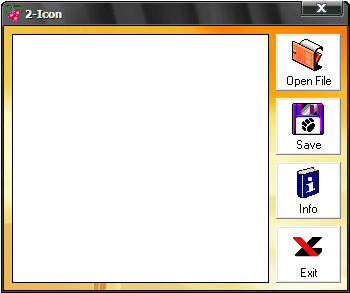
2-Icon merupakan sebuah program sangat sederhana yang berfungsi untuk mengubah file BMP, JPG atau GIF ke format icon (ICO) dengan ukuran 32x32. Berikut ini tampilannya:


Nah kalau dilihat dari tampilannya aku yakin siapa saja tidak akan mengalami kesulitan menggunakan program sederhana ini. Berikut ini contoh sebuah file gambar yang akan aku ubah dari JPG ke ICO.